
Describe your marketplace
- In the menu, under , click .
- In Describe your marketplace, say in a few sentences what is sold or rented, to whom and by whom. Give what matters to you: rental by the day or the week, a deposit, professional and private sellers, the country.
- Click Propose a plan. The plan takes up to a minute.
Read the plan
The assistant answers with:
- a summary, which says what the plan sets up and why it fits what you described;
- questions, up to three: add your answers to your description and click Propose a plan again for a finer plan;
- the plan, part by part (Member groups, Listing attributes, Categories, Order types, Pages, Settings, Blog), one line per thing it adds or changes, marked Add or Change.
It starts from what your marketplace already has: it does not add again a category or a page you already created.
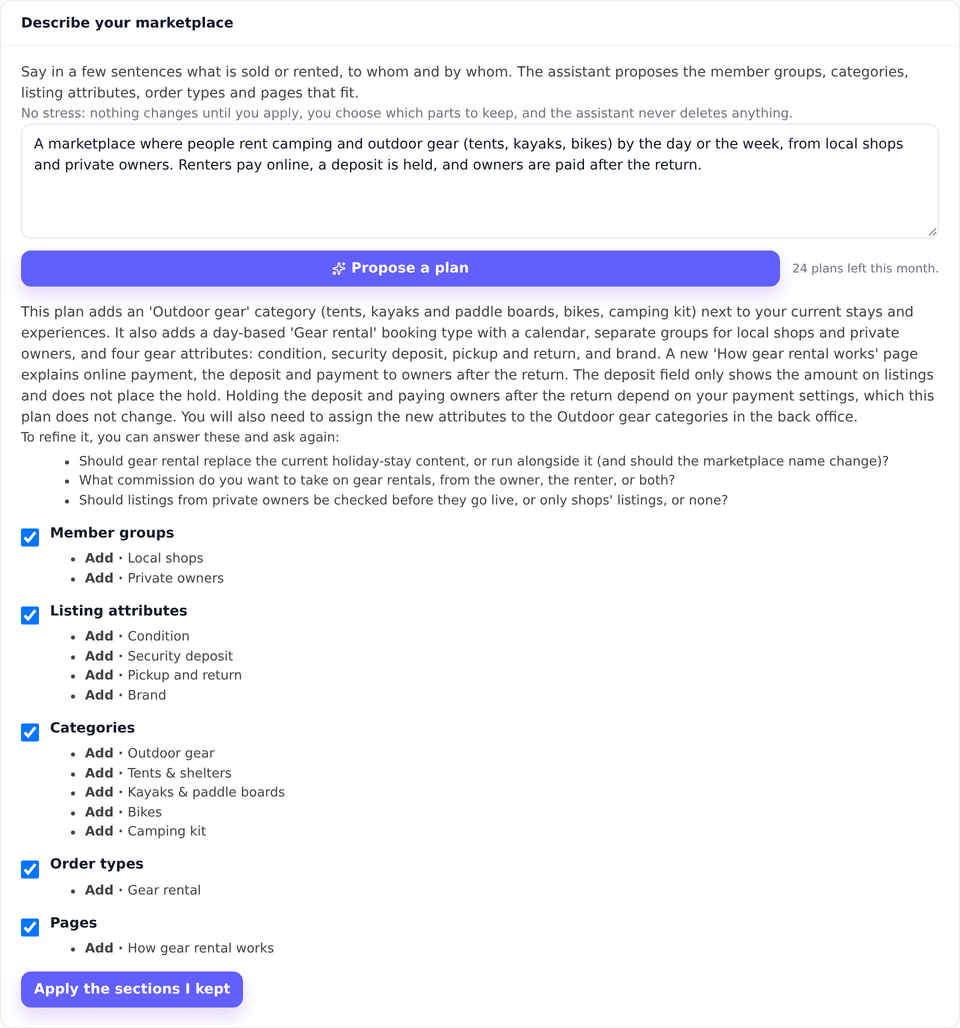
Apply what you keep
- Untick a part you do not want. The plan is checked again for the parts you keep.
- Click Apply the sections I kept.
- A confirmation message says how many changes were applied. Open the screens concerned (Catalog, Settings, Pages) to review and complete them.
What your users see
What you apply shows on the storefront as if you had created it by hand: the new categories in the menus and the search, the attributes in the listing form and the filters, the pages at their URL. The assistant is asked to start pages of terms of use or privacy with a note saying a lawyer must review them: read and complete them before you link to them.
Edge cases and limits
- Nothing is deleted: a plan that would delete something is refused, and applying never removes what your marketplace has.
- One part at a time is not always possible: when a kept part depends on one you untick (an attribute used by a category, for instance), the assistant says so, and nothing is applied.
- The description stays with you: the assistant reads your description and the structure of your marketplace (categories, attributes, order types, groups, pages, blog), never your members, listings or orders.
- 30 plans a month per marketplace: each plan proposed counts, applied or not.
- The texts the assistant writes (pages, category descriptions) are a starting point: they use your marketplace’s language and stay yours to correct.