
To integrate your Instagram feed into your homepage (or any pages), we recommend you use an Instagram embedding solution like Snapwidget (or similar apps).
The solution will provide you with a script you can copy and paste in the Home / Custom Section in your admin panel.
Step 1 : Copy the code provided for your widget.
Step 2 : Go to your Kreezalid admin panel to paste the code. Make sure to be on the “Source code” mode when pasting the code snippet :
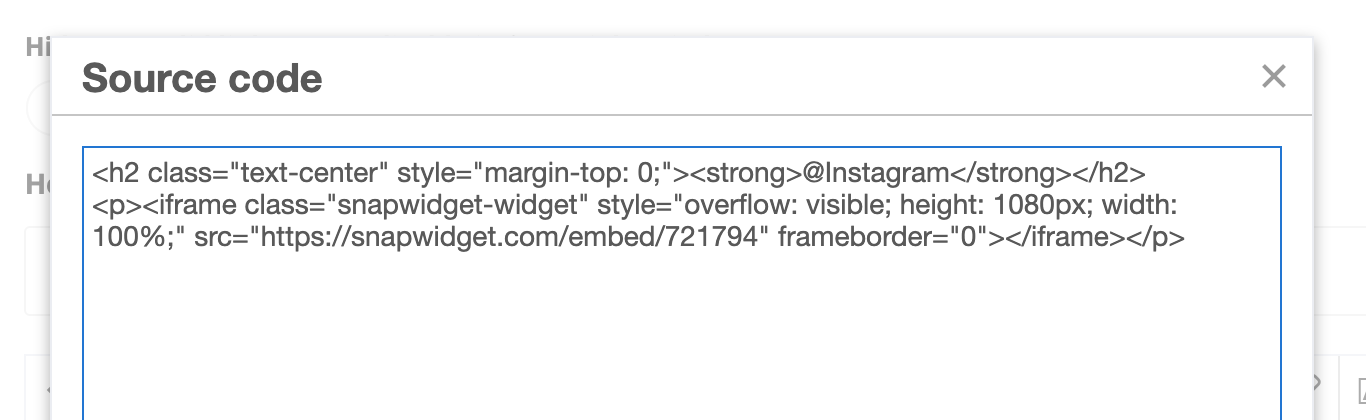
Place the code in the space you want to have the widget displayed.
Step 3 : Once pasted in, click Save changes
Step 4 : Refresh your page and the widget will appear.
Example of result expected on your marketplace :

List of app you can use to embed your Instagram feed :
- LightWidget Visit lightwidget
- SnapWidget Visit Snapwidget
- Juicer.io Visit Juicer